Getting Started
P27 Solver
A native Windows GTO solver for heads-up postflop — Equity FN and Solve FN in one workspace.
Set board and ranges → choose Solve Quality → SOLVE → wait through 0% setup, iteration %, then 100% packaging → walk the tree → read Strategy, EV, Equity, Reach, and Composition. Multiway trees, tournament / MTT / ICM as a working workflow, Import, GTO Adjustments, and villain profiles are Coming Soon.
Equity FN & Solve FN
P27 Solver separates equity analysis from GTO solving. These are two different functions in the application.
Equity FN — Equity analysis
Equity FN runs independently of the solver. Use it for range-vs-range equity on the current board before — or without — a full GTO solve. After a solve, the Equity tab can also show equity at the current tree node.
Solve FN — GTO solving · Flop, Turn & River
Solve FN is the GTO engine. One SOLVE control detects the street from the board (3 cards = Flop, 4 = Turn, 5 = River). While running it reads Solving…; when the UI has the result it reads SOLVED. Solve Quality (Quick / Normal / Pro) sets how far CFR runs.
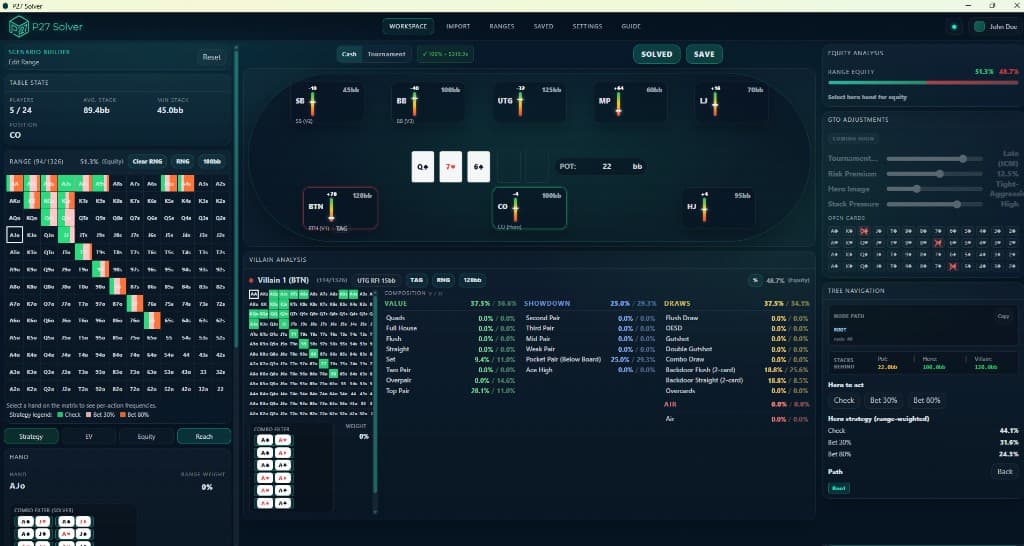
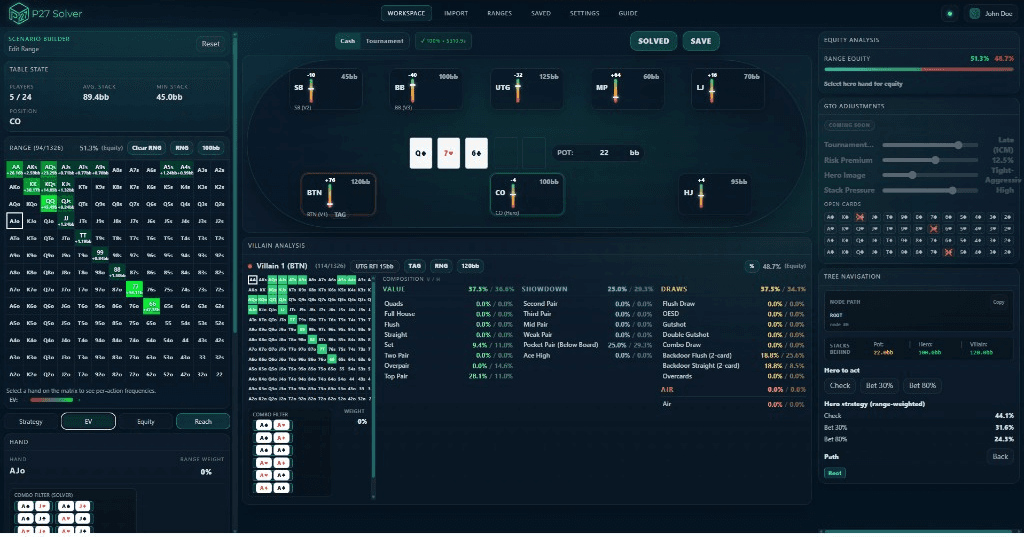
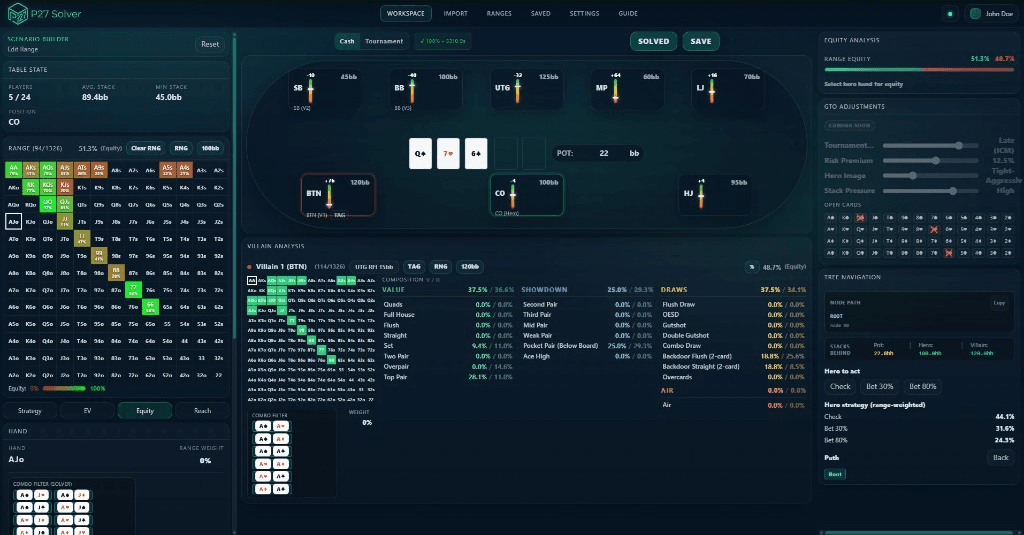
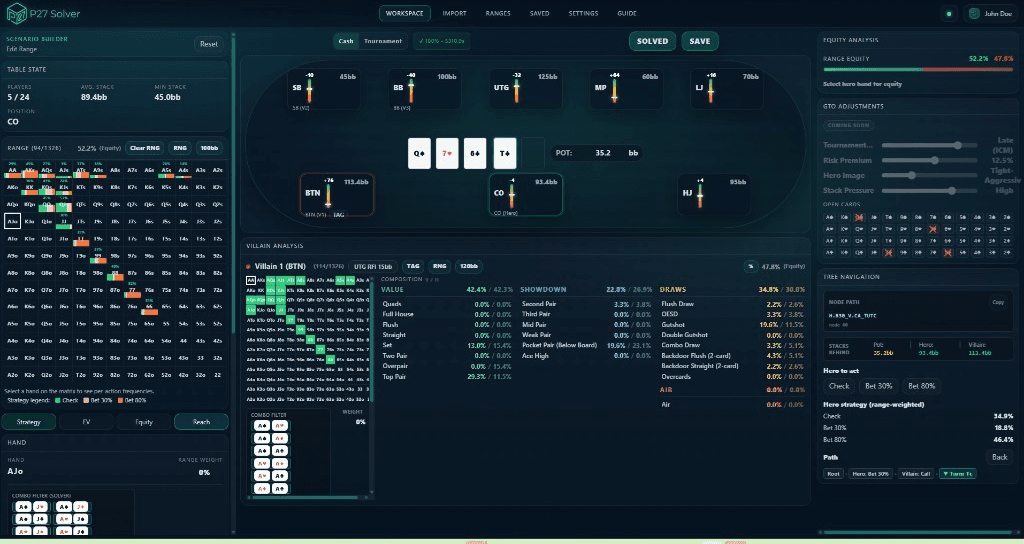
Workspace screenshots
Core Concepts
Nash Equilibrium (GTO)
A set of strategies where no player can improve their expected value by changing their own strategy alone — the unexploitable baseline the solver converges toward.
Range vs. Range
Every decision is solved for entire hand ranges, not single hands, so each combo is assigned the frequency that maximizes EV against the opponent’s whole range.
Equity & EV
Equity is your share of the pot at showdown; expected value (EV) is the long-run chips a line wins. Equity FN shows how ranges run out; Solve FN reports EV after a GTO solve.
Exploitability
How much a strategy can lose to a perfect counter-strategy. A fully converged solve approaches zero exploitability.
The CFR Engine
Counterfactual Regret Minimization (CFR)
An iterative self-play algorithm that repeatedly measures the regret of each action and shifts frequency toward the choices it “wishes” it had made, converging toward the optimal strategy over many iterations. The engine is written in Rust and runs natively. The shipping app solves heads-up postflop trees.
Regret & Strategy Updates
Regret is the difference between the action taken and the best action in hindsight. Strategies are averaged over all iterations so the final result reflects the equilibrium mix rather than the latest single pass.
Equity FN vs Solve FN
Equity FN and Solve FN are separate functions. Equity FN previews range-vs-range equity on a board without solving. Solve FN runs the CFR GTO engine for Flop, Turn, and River. After a solve completes and the result is in the UI, Strategy, EV, Reach, and node Equity are read from the solved data.
Solve Quality
Quick, Normal, and Pro presets control how far CFR runs — not a second product. Choose a preset before SOLVE.
How to Use
- 01
Set the spot
Heads-up postflop: hero versus one villain. Deal the flop, turn, or river to define the board.
- 02
Assign ranges
Edit the hand grid for hero and the villain. Preflop charts in the app can be applied or adjusted on the grid.
- 03
Choose Solve Quality
Pick Quick, Normal, or Pro before you solve.
- 04
SOLVE
Run Solve FN. Watch 0% setup, then iteration %, then 100% packaging until the badge completes and the button reads SOLVED.
Street is detected from board cards (3 = Flop, 4 = Turn, 5 = River). No manual street selection. GTO Adjustments are Coming Soon and are not in the shipping app.
- 05
Walk, save & review
Walk the tree. Read Strategy, EV, Equity, Reach, and Composition. Save the solved spot locally and reopen it later for detailed review without re-solving.
Solve progress
Shown next to the cash/tournament toggle while a solve runs, then as a completed badge. Computation is local — not a cloud download.
0%
CFR has not started counting iterations yet. The engine is building the situation: equity matrices for this board and the two ranges, then the decision tree. Progress stays at 0% during that setup. Computation is local — not a cloud download.
1%–99%
CFR is running. The percentage is current iteration ÷ total iterations for this Solve Quality and street. The time counter is elapsed seconds.
100% while still Solving…
Iterations have finished. The engine is packaging a large strategy payload and handing it to the interface. On flop this can take up to a few minutes. Strategy / EV / Reach are not reliable until the badge flips to the completed state and the button reads SOLVED.
Completed (✓ 100% • time)
The UI has the result. Walk the tree and read Strategy, EV, Equity, Reach, and Composition at the current node.
Views & panels
Strategy
13×13 grid of hand classes (AA, AKs, AKo, …). Each cell is the mixed strategy at the current node. Coloured bars = actions from the legend under the grid (Fold, Check/Call, Bet/Raise sizes from Tree Settings). Mixed colours in one cell = mixed frequencies. Select a hand for particular combos, not only the class average.
EV
Available after Solve FN completes and the result is in the UI. Matrix cell = average EV of that hand class at the current node (bb). Combo detail = EV by action (check vs each bet size, etc.). Colour is an EV heat scale — not the Strategy action legend.
Equity
Equity FN can run without a GTO solve. After a solve, the Equity tab shows equity at the current node on the same grid. Class averages on the matrix; particular combos in detail.
Reach
A toggle on the Strategy / EV / Equity row — meaningful after a solve on a line. Shows what fraction of each combo is still in play after the actions on the current path. Very small reach is drawn taller so the grid stays readable; the printed percentage is the real reach.
Composition
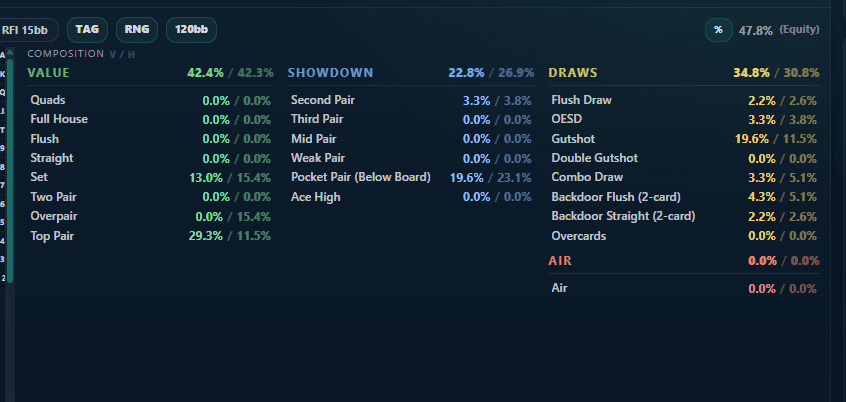
How current ranges break down on this board (hero vs villain): quads through air, pairs, draws, and related categories. Values are % of the range. Click a category to highlight matching hands. This is range-vs-board classification, not the GTO mix; it updates with the board and, when solved, the ranges still reaching the node.
Game Tree
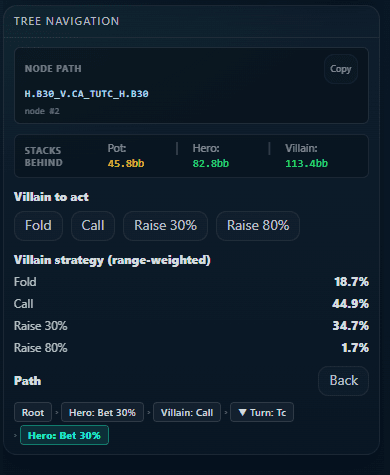
After a solve you start at the root node for that street. Click actions (Check, Bet %, Fold, Call, Raise — labels match bet sizes for the spot) to move down the line. Turn and river include chance nodes for the next card. Path is shown; Back or a previous segment returns. All views refer to the node you are on.
Solver Behavior
Solve FN · Automatic Street Detection
One SOLVE control. Street comes from board cards (3 = Flop, 4 = Turn, 5 = River). The button reads Solving… while work is in progress and SOLVED when the UI has the result.
Solve progress · local computation
Progress next to the cash/tournament toggle: 0% while the engine builds equity matrices and the tree; 1%–99% while CFR iterations run; 100% while still Solving… means packaging the strategy payload into the UI (can take up to a few minutes on flop). Strategy / EV / Reach are reliable only after the completed badge (✓ 100% • time) and SOLVED.
Equity FN · Independent Analysis
Equity FN does not require a GTO solve. It calculates range-vs-range equity on the current board. After a solve, the Equity tab can also show equity at the current node.
Sleep & Standby Prevention
Flop solves can run for several minutes or longer. During a flop solve the application prevents your computer from entering sleep or standby. Turn and river solves typically complete in seconds and do not require this protection.
Save & review
After a solve, use SAVE to store the situation on your machine. Open it later from Saved and review Strategy, EV, Equity, Reach, Composition, and the tree in detail at any time without running Solve FN again.
Consistent Engine
Flop, Turn, and River share the same underlying CFR+ engine and regret matching. The difference is the number of chance-node boards evaluated per iteration (Block MCCFR sampling on Flop and Turn vs. full evaluation on the River).
Suggested System Specifications
The values below are general guidelines based on typical use. Actual requirements may vary depending on range complexity, board texture, bet-size configurations, and other factors. These figures are provided for informational purposes only and do not constitute guaranteed minimum requirements.
Processor (CPU)
Modern multi-core processor (4 cores / 8 threads or above recommended). The solver uses multiple threads; more cores generally mean faster convergence.
Memory (RAM)
16 GB minimum. 32 GB or more is recommended, especially for Flop solves with wider ranges. Larger ranges or additional bet sizes increase memory usage. After a heavy solve, waiting a few minutes before the next one helps memory free up.
Storage
SSD recommended. The application itself is compact; saved situations benefit from fast storage so you can reopen and review solves later in detail.
Operating System
Windows 10 or later (64-bit) only. The native engine uses platform-specific optimizations including AVX2 where available.
About
P27 Solver is a desktop GTO solver for heads-up postflop, built for offline analysis. Equity FN and Solve FN run locally. Ranges, boards, and solves stay on your machine. Licences are sold through Lemon Squeezy as merchant of record. Contact info@p27solver.com.
Ready to run a custom solve?
Download for Windows, or purchase a licence via Lemon Squeezy. The key arrives by email after purchase.